A program waitlist is an ordered list of eligible people waiting for a service that has a limited number of spaces. Waitlists can be difficult to manage and prioritize, especially when several staff touch the list, funders set their own priorities, and people’s situations change while they wait.
Housing, counseling, childcare, and legal programs run into this when more people ask for help than the program can serve. Most start with a spreadsheet. Over time duplicates pile up, nobody remembers who called whom, and no one can say with confidence who is next.
This guide covers whether to create a record for each person, what that record should hold, how to build a scoring matrix, how often to make contact, and which metrics show whether people are moving toward enrollment.
Last reviewed: November 5, 2026
What is a program waitlist, and when do you need one?
A program waitlist fits any service with real capacity limits, such as a counseling caseload, a childcare classroom, or a set number of housing units. People who qualify join the list in an order your program sets, and they receive an offer as spaces open.
Whether to keep one at all is worth deciding on purpose. Team DSC, an Australian disability sector resource, advises checking whether people will realistically move off the list, either through regular turnover or added capacity. A list with little turnover and no funded expansion can hold names that have little chance of receiving support.
If you already run a list, watch for duplicate names, missing contact dates, staff keeping their own copies, and confusion about who is next when a space opens. Several of these at once suggest the list needs a better structure.
Should you create a record for people on the waitlist?
Yes. Create a client record the day someone joins the list. Intake details are captured once, and contact attempts, eligibility documents, and offers attach to the same person from the start. When a space opens, the person’s status changes to enrolled and the file moves forward with no re-keying.
This is the main reason to leave the spreadsheet behind. A separate sheet means someone retypes names, phone numbers, and eligibility notes at enrollment, which is when the program is busiest and typos cost the most. Foothills Gateway, a Colorado case management agency, takes the record-first approach by keeping a person’s waiting list status inside their individual service plan.
A waitlist record can stay light. Collect what you need to confirm eligibility and reach the person, then add more at intake.
What should every waitlist record include?
Every waitlist record should capture who the person is, what they are waiting for, the date they joined, their eligibility, any priority score, and a full history of contact and offers. These eight fields cover it:
- Contact details and preferred contact method
- Service requested and program
- Date added, which sets the tiebreaker order
- Eligibility status and documents received
- Priority score and the reason for it, if any
- Last contact date, next contact date, and the staff member who owns the follow-up
- Offer history, including the date offered, whether it was accepted or declined, and the reason for any decline
- Removal date and the reason for removal
Foothills Gateway’s published policy tracks similar details, including the services requested, a timeline of need, and offer and decision records.
Required fields and fixed dropdown values keep entries consistent no matter who types them. Our guide to improving case management data quality covers how to set those up.
How do you prioritize a waitlist fairly?
Score each person with questions based on your program eligibility rules and your priorities, then offer the next space to the highest score. Grant guidelines or your organization’s mission priorities usually decide what those questions are, so pull them from your award terms and mission statement before you design anything.
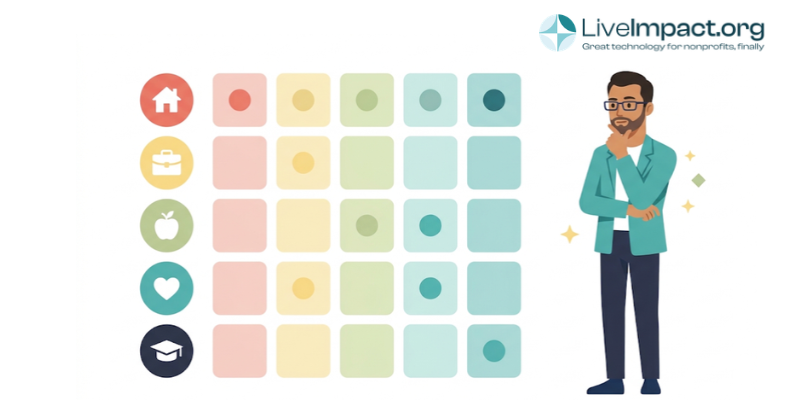
A simple scoring matrix is a short list of questions with points attached. Program eligibility comes first and works as a yes or no gate. The next questions cover the priorities your grant or mission sets, such as a population your grant targets or a need your mission puts first, and each answer earns a set number of points. Date added comes last and breaks ties. This example is for a fictional housing program funded to serve families with children, so having children in the household earns points here and might earn none in another program’s matrix.
Fictional example for a family housing program. Your questions and points should come from your grant guidelines and mission priorities.
Write the matrix down, apply it the same way to everyone, and record the reason for any exception. Programs with no priority populations can rely on date order alone, and some add an emergency override for situations like homelessness or the loss of a primary caregiver.
Foothills Gateway shows how a published policy mixes these. Most services follow date order, one family support program gives the first offer to the highest needs score, and emergencies such as homelessness, abuse or neglect, danger to self or others, or loss of a primary caregiver can override the usual order. Declining a standard offer leaves a person’s place intact, and the decline is recorded with a reason.
Funders and public programs often set their own ordering rules, so confirm your approach with your funder or legal counsel. Housing programs that already work from a coordinated entry list should also read how HMIS and case management software divide the work, since the community’s process may already set part of the order.
How often should you contact people on the waitlist?
Contact people on a schedule you set in advance, and assign one staff member to own each check-in. Team DSC explains that regular contact catches changes that could affect priority and reveals when someone has already started with another service.
Match the interval to how fast your list moves. Foothills Gateway updates its list monthly, and case managers review each person’s status at every plan meeting. A fast-moving counseling program might check in monthly. A housing program with slow turnover might choose a quarterly rhythm. Pick a default, write it down, and let staff adjust it for individual situations.
A short check-in covers four points:
- Confirm the person still wants the service.
- Confirm their phone number, email address, and mailing address.
- Ask whether their needs or circumstances have changed.
- Share a realistic estimate of timing.
Log the date and outcome of every attempt, and set the next contact date before ending each check-in. That habit keeps the schedule running without anyone relying on memory.
What do you tell people about how long they will wait?
Give an honest range, explain how the order works, and offer other options. Team DSC recommends telling people roughly how long to expect so they can make an informed choice, and handing them a list of other providers who might help sooner. Referrals should serve the person’s best interests and carry no conflict of interest for your organization.
When you cannot estimate, say so and explain what drives the timing, such as staff turnover or the funding cycle. Team DSC also suggests capping how long someone can stay on a list, so that no one is forgotten by accident. When a person reaches the cap, a staff member reviews their situation and decides whether to continue, refer, or close the entry.
When should you remove someone from the list?
Remove someone only for a defined reason, and write that reason on the record. Foothills Gateway lists specific removal reasons, including enrollment in the requested service, a move outside the service area, a request from the individual or family, loss of eligibility, and no longer needing the service.
A practical set for most programs is enrolled, requested removal, no longer eligible, no longer needs the service, moved out of the area, and unreachable after a set number of attempts. A declined offer is a separate event, and under the Foothills Gateway policy a standard decline keeps a person on the list. Before removing someone you cannot reach, make a documented final attempt through every contact method on file, then wait a stated period. Keep the removed record so you can answer questions later about who was on the list and why they left.
How do you move someone from the waitlist to enrolled without starting over?
Begin onboarding while the person is still waiting, and change their status instead of building a new file. Team DSC recommends starting the intake pathway and paperwork when a space is about to open, which saves time for everyone. Because the person already has a record, intake, assessment, and the service plan pick up in the same file.
What metrics show people are moving toward enrollment?
Track a handful of numbers every month, by program, and review them with your team. These six give a clear picture:
- People on the list, plus how many joined and left this month
- People enrolled from the list each month
- Average time on the list, and the longest current wait
- Time from offer to enrollment
- Offer acceptance and decline rates, with the reasons for declines
- Contact attempts, and the number of people who could not be reached
Rising time on the list or a growing number of declines points to a problem worth investigating, such as an unclear ordering rule, unresponsive contact information, or too few spaces. Reports built from structured fields produce these numbers without a monthly spreadsheet exercise, which is one more reason to keep the list in your client system.
Do you need waitlist management software?
A spreadsheet works for one small program with a short list and one owner. Waitlist management software makes sense when you run several programs, several staff touch the list, funders ask for reports, or you need an audit trail of every contact and offer. Double entry at enrollment is the clearest reason to move off the spreadsheet.
Two kinds of tools show up in searches. Generic waitlist apps are built for restaurants, events, and appointment booking, and they track a place in line. A case management system treats the waitlist as a stage in the person’s record, so the same file later holds intake, services, and outcomes. Look for configurable statuses, automated reminders, a record of every contact and offer, and reporting by program. Our comparison of Excel and case management software walks through where spreadsheets break down.
LiveImpact’s program case management software lets staff build forms and workflows for each program without a developer, send email and text reminders from the same platform, and keep one client record that follows a person across programs. Ask any vendor to show your exact waitlist setup before you commit, including how reminders and reports would work for your list.
What are the five rules of a fair program waitlist?
A fair waitlist rests on five habits that any program can adopt, whatever tools it uses:
- Give every entry the same required fields.
- Score people with a written matrix built from eligibility and priorities.
- Contact each person on a schedule, with one staff owner.
- Record every offer, decline, and exception, with the reason.
- Keep the list in the client record.
Programs that follow these five habits can explain any decision on the list to a funder, a board member, or the person waiting. If you want to see how a client record can carry someone from the waitlist through intake, services, and outcomes, the LiveImpact team can walk through your program’s setup with you.